머신러닝 개요
머신러닝이란 기계 스스로 데이터를 학습하여 서로 다른 변수 간의 관계를 찾아 나가는 과정
머신러닝은 크게 두가지 유형으로 분류된다.
지도 학습은 정답 데이터를 다른 데이터와 함께 컴퓨터 알고리즘에 입력하는 방식이다
반면 비지도 학습은 정답 데이터 없이 컴퓨터 알고리즘 스스로 데이터로부터 숨은 패턴을 찾아내는 방식이다.
지도학습의 대표적인 방법은 회귀분석, 분류 모형이 있고 비지도학습에는 군집 분석이 있다.
머신러닝의 프로세스는 다음과 같다.
1. 컴퓨터 알고리즘이 이해할 수 있는 형태로 데이터를 변환하는 작업을 진행
2. 여러 속성 간의 관계를 분석하여 결과를 예측하는 모형을 학습을 통해 찾는다.
3. 검증 과정을 통해 학습을 마친 모형의 예측 능력을 평가하고, 평가 결과를 바탕으로 최종모형을 확정하여
문제 해결에 적용한다.
회귀분석
어떤 변수가 다른 변수에 영향을 준다면 두 변수 사이에 선형 관계가 있다고 이야기한다. 이와 같은 선형 관계를
알고 있다면 새로운 독립변수 x값이 주어졌을 때 거기에 대응되는 y값을 예측할 수 있다.
이처럼 두 변수 사이에 일대일로 대응되는 확률적, 통계적 상관성을 찾는 알고리즘을 단순회귀분석 이라고 한다.
수학적으로는 종속 변수 Y와 독립 변수 X 사이의 관계를 1차함수 Y=aX+b로 나타내는데,
단순회귀분석 알고리즘은 훈련 데이터를 이용하여 a와 b를 반복학습을 통해 찾는다.
import pandas as pd
import numpy as np
import matplotlib.pyplot as plt
import seaborn as sns

df = pd.read_csv('/content/drive/MyDrive/part7/auto-mpg.csv', header=None)

df.columns = ['mpg', 'cylinders', 'displacement', 'horsepower', 'weight', 'acceleration', 'model year', 'origin', 'name']

print(df.head())
print('\n')

pd.set_option('display.max_columns', 10) #출력할 열의 개수 한도를 늘린다
print(df.head())

    mpg  cylinders  displacement horsepower  weight  acceleration  model year  \
0  18.0          8         307.0      130.0  3504.0          12.0          70
1  15.0          8         350.0      165.0  3693.0          11.5          70
2  18.0          8         318.0      150.0  3436.0          11.0          70
3  16.0          8         304.0      150.0  3433.0          12.0          70
4  17.0          8         302.0      140.0  3449.0          10.5          70

   origin                       name
0       1  chevrolet chevelle malibu
1       1          buick skylark 320
2       1         plymouth satellite
3       1              amc rebel sst
4       1                ford torino


    mpg  cylinders  displacement horsepower  weight  acceleration  model year  \
0  18.0          8         307.0      130.0  3504.0          12.0          70
1  15.0          8         350.0      165.0  3693.0          11.5          70
2  18.0          8         318.0      150.0  3436.0          11.0          70
3  16.0          8         304.0      150.0  3433.0          12.0          70
4  17.0          8         302.0      140.0  3449.0          10.5          70

   origin                       name
0       1  chevrolet chevelle malibu
1       1          buick skylark 320
2       1         plymouth satellite
3       1              amc rebel sst
4       1                ford torino
다음은 데이터를 탐색하여 데이터의 자료형과 갯수, 주요 통계 정보를 확인한다.
print(df.info())
print('\n')

print(df.describe())

<class 'pandas.core.frame.DataFrame'>
RangeIndex: 398 entries, 0 to 397
Data columns (total 9 columns):
 #   Column        Non-Null Count  Dtype
---  ------        --------------  -----
 0   mpg           398 non-null    float64
 1   cylinders     398 non-null    int64
 2   displacement  398 non-null    float64
 3   horsepower    398 non-null    object
 4   weight        398 non-null    float64
 5   acceleration  398 non-null    float64
 6   model year    398 non-null    int64
 7   origin        398 non-null    int64
 8   name          398 non-null    object
dtypes: float64(4), int64(3), object(2)
memory usage: 28.1+ KB
None


              mpg   cylinders  displacement       weight  acceleration  \
count  398.000000  398.000000    398.000000   398.000000    398.000000
mean    23.514573    5.454774    193.425879  2970.424623     15.568090
std      7.815984    1.701004    104.269838   846.841774      2.757689
min      9.000000    3.000000     68.000000  1613.000000      8.000000
25%     17.500000    4.000000    104.250000  2223.750000     13.825000
50%     23.000000    4.000000    148.500000  2803.500000     15.500000
75%     29.000000    8.000000    262.000000  3608.000000     17.175000
max     46.600000    8.000000    455.000000  5140.000000     24.800000

       model year      origin
count  398.000000  398.000000
mean    76.010050    1.572864
std      3.697627    0.802055
min     70.000000    1.000000
25%     73.000000    1.000000
50%     76.000000    1.000000
75%     79.000000    2.000000
max     82.000000    3.000000
horsepower 열은 자료형이 문자형인데, 위에서 봤을 때는 숫자가 기록되어 있는 것을 볼 수 있다.
이는 문자형을 숫자형으로 바꿀 필요가 있음을 의미한다.
누락데이터는 '?' 문자로 바꾼 다음, 누락 데이터가 있는 행을 삭제하고 astype() 메소드로 문자열을 실수형으로 바꾼다.
print(df['horsepower'].unique())
print('\n')

df['horsepower'].replace('?', np.nan, inplace=True)
df.dropna(subset=['horsepower'], axis=0, inplace=True)
df['horsepower'] = df['horsepower'].astype('float')

print(df.describe())

['130.0' '165.0' '150.0' '140.0' '198.0' '220.0' '215.0' '225.0' '190.0'
 '170.0' '160.0' '95.00' '97.00' '85.00' '88.00' '46.00' '87.00' '90.00'
 '113.0' '200.0' '210.0' '193.0' '?' '100.0' '105.0' '175.0' '153.0'
 '180.0' '110.0' '72.00' '86.00' '70.00' '76.00' '65.00' '69.00' '60.00'
 '80.00' '54.00' '208.0' '155.0' '112.0' '92.00' '145.0' '137.0' '158.0'
 '167.0' '94.00' '107.0' '230.0' '49.00' '75.00' '91.00' '122.0' '67.00'
 '83.00' '78.00' '52.00' '61.00' '93.00' '148.0' '129.0' '96.00' '71.00'
 '98.00' '115.0' '53.00' '81.00' '79.00' '120.0' '152.0' '102.0' '108.0'
 '68.00' '58.00' '149.0' '89.00' '63.00' '48.00' '66.00' '139.0' '103.0'
 '125.0' '133.0' '138.0' '135.0' '142.0' '77.00' '62.00' '132.0' '84.00'
 '64.00' '74.00' '116.0' '82.00']


              mpg   cylinders  displacement  horsepower       weight  \
count  392.000000  392.000000    392.000000  392.000000   392.000000
mean    23.445918    5.471939    194.411990  104.469388  2977.584184
std      7.805007    1.705783    104.644004   38.491160   849.402560
min      9.000000    3.000000     68.000000   46.000000  1613.000000
25%     17.000000    4.000000    105.000000   75.000000  2225.250000
50%     22.750000    4.000000    151.000000   93.500000  2803.500000
75%     29.000000    8.000000    275.750000  126.000000  3614.750000
max     46.600000    8.000000    455.000000  230.000000  5140.000000

       acceleration  model year      origin
count    392.000000  392.000000  392.000000
mean      15.541327   75.979592    1.576531
std        2.758864    3.683737    0.805518
min        8.000000   70.000000    1.000000
25%       13.775000   73.000000    1.000000
50%       15.500000   76.000000    1.000000
75%       17.025000   79.000000    2.000000
max       24.800000   82.000000    3.000000
다음은 회귀분석에 사용할 변수를 선택하는 것이다. 종속변수인 mpg열과
독립변수인 cylinders, horsepower, weight 를 사용한다.
ndf = df[['mpg', 'cylinders', 'horsepower', 'weights']]
print(ndf.head())

    mpg  cylinders  horsepower  weight
0  18.0          8       130.0  3504.0
1  15.0          8       165.0  3693.0
2  18.0          8       150.0  3436.0
3  16.0          8       150.0  3433.0
4  17.0          8       140.0  3449.0
먼저 plot() 메소드로 weight와 mpg의 상관성을 확인해보도록 하자.
ndf.plot(kind='scatter', x='weight', y='mpg', c='coral', s=10, figsize=(10, 5))
plt.show()
plt.close()
Seaborn 라이브러리의 regplot() 함수를 이용하여 두 변수에 대한 산점도를 그릴 수 있다.
이때 기본적으로 회귀선을 표시할 수 있다.
fig = plt.figure(figsize=(10, 5))
ax1 = fig.add_subplot(1, 2, 1)
ax2 = fig.add_subplot(1, 2, 2)
sns.regplot(x='weight', y='mpg', data=ndf, ax=ax1)
sns.regplot(x='weight', y='mpg', data=ndf, ax=ax2, fit_reg=False)
plt.show()
plt.close()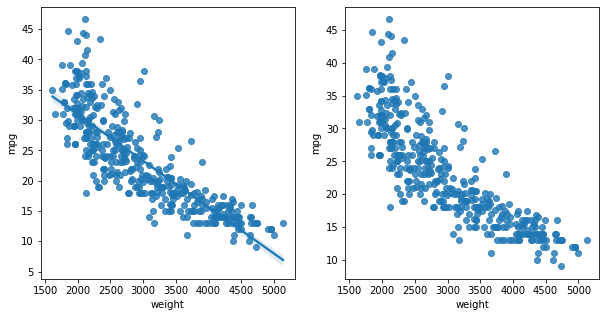
jointplot() 함수도 사용할 수 있는데, 두 변수의 히스토그램이 x, y축에 별도로 표시된다.
sns.jointplot(x='weight', y='mpg', data=ndf)
sns.jointplot(x='weight', y='mpg', kind='reg', data=ndf)
plt.show()
plt.close()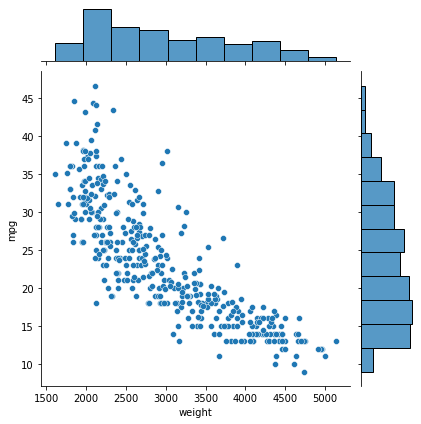
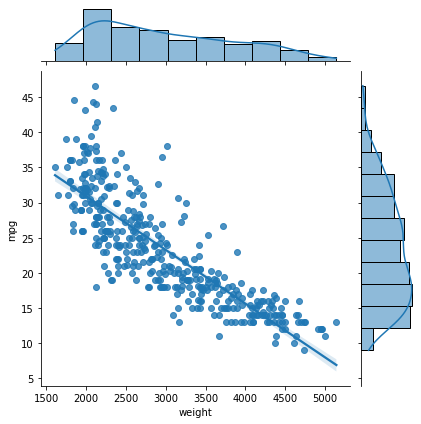
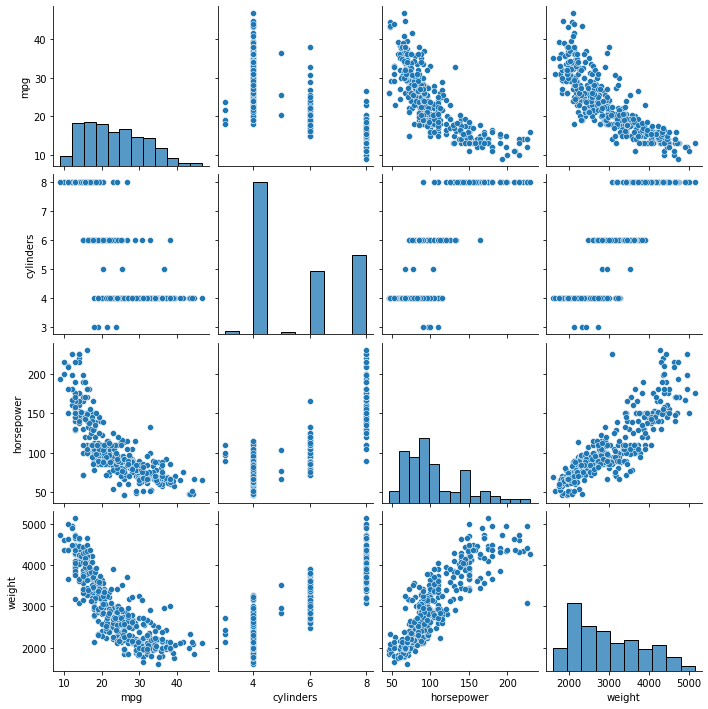
pairplot() 함수를 사용하여 데이터프레임의 열을 두 개씩 짝지을 수 있는 모든 경우에 대해 산점도를 그릴 수 있다.
grid_ndf = sns.pairplot(ndf)
plt.show()
plt.close()
훈련/ 검증 데이터를 분할하는 과정이다.
x = ndf[['weight']]
y = ndf['mpg']

from sklearn.model_selection import train_test_split
x_train, x_test, y_train, y_test = train_test_split(x, y, test_size=0.3, random_state=10)

print(len(x_train))
print(len(x_test))

313
79
다음은 모형을 학습하고 검증해보자. sklearn 라이브러리에서 LinearRegression() 함수로 회귀분석 모형 객체를 생성하고
적용할 수 있다.
from sklearn.linear_model import LinearRegression
lr = LinearRegression()
lr.fit(x_train, y_train)
print(lr.score(x_train, y_train))

0.6888362702776236


print(lr.coef_)
print(lr.intercept_)

[[-0.00758599]]
[46.1048919]
결정계수와 기울기, y절편 즉 a와 b 값을 볼 수 있다.
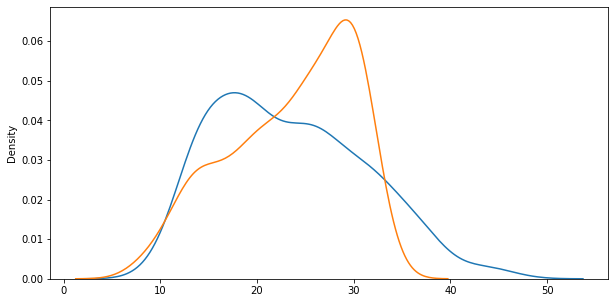
그렇다면 예측한 값과 실제값을 비교해보자. 분포를 볼 수 있는 distplot() 함수를 사용하자.
y_hat = lr.predict(x)

plt.figure(figsize=(10, 5))
ax1 = sns.distplot(y, hist=False, label='y')
ax2 = sns.distplot(y_hat, hist=False, label='y_hat', ax=ax1)
plt.show()
plt.close()
다항회귀분석
직선보다는 곡선으로 설명하는 것이 적합할 때, 단순회귀분석은 부적합하다. 이럴 때 다항 함수를 사용하여 보다 복잡한
곡선 형태의 회귀선을 표현할 수 있다.
다항회귀분석은 2차함수 이상의 다항 함수를 이용하여 두 변수간의 선형 관계를 설명하는 알고리즘이다.
df.columns = ['mpg', 'cylinders', 'displacement', 'horsepower', 'weight', 'acceleration', 'model year', 'origin', 'name']

df['horsepower'].replace('?', np.nan, inplace=True)
df.dropna(subset=['horsepower'], axis=0, inplace=True)
df['horsepower'] = df['horsepower'].astype('float')

ndf = df[['mpg', 'cylinders', 'horsepower', 'weight']]
X = ndf[['weight']]
Y = ndf[['mpg']]

from sklearn.model_selection import train_test_split
x_train, x_test, y_train, y_test = train_test_split(X, Y, test_size=0.3, random_state=10)
이와 같이 데이터를 준비하면, 모형을 학습하고 검증하는 절차를 거친다.
사이킷런 라이브러리에서 LinearRegression() 함수와 다항식 변환을 위한 PolynomialFeature() 함수를 불러온다.
PolynomialFeautre() 함수에서 degree 매개변수를 지정하면, n차항 객체를 생성한다.
from sklearn.linear_model import LinearRegression
from sklearn.preprocessing import PolynomialFeatures

poly = PolynomialFeatures(degree=2)
x_train_poly = poly.fit_transform(x_train)

print(x_train.shape)
print(x_train_poly.shape)

(274, 1)
(274, 3)
항이 3개까지 늘어난 모습을 볼 수 있다.
LinearRegression() 함수로 회귀분석 모형 객체를 생성하고 학습해보자.
pr = LinearRegression()
pr.fit(x_train_poly, y_train)

x_test_poly = poly.fit_transform(x_test)
r_square = pr.score(x_test_poly, y_test)
print(r_square)

0.7087009262975481
y_hat_test = pr.predict(x_test_poly)
fig = plt.figure(figsize=(10, 5))
ax = fig.add_subplot(1, 1, 1)
ax.plot(x_train, y_train, 'o', label = 'Train Data')
ax.plot(x_test, y_hat_test, 'r+', label='Predicted Value')
ax.legend(loc='best')
plt.xlabel('weight')
plt.ylabel('mpg')
plt.show()
plt.close()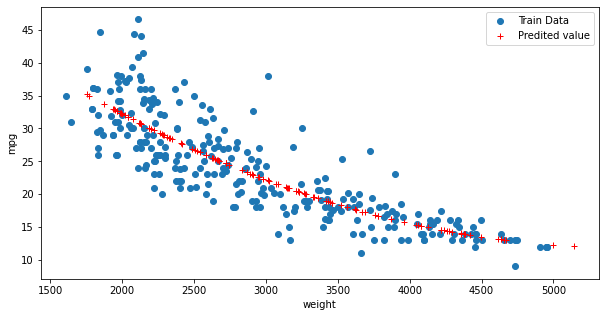
훈련 데이터와 학습된 모형의 회귀선을 비교하여 출력한 값이다.
단순회귀분석에 비해 데이터의 패턴을 더욱 잘 설명하고 있다.
이번에는 분포도를 가지고 확인해보도록 하자.
x_poly = poly.fit_transform(x)
y_hat pr.predict(x_poly)

plt.figure(figsize=(10, 5))
ax1 = sns.distplot(Y, hist=False, label='y')
ax2 = sns.distplot(y_hat, hist=False, label='y_hat', ax=ax1)
plt.show()
plt.close()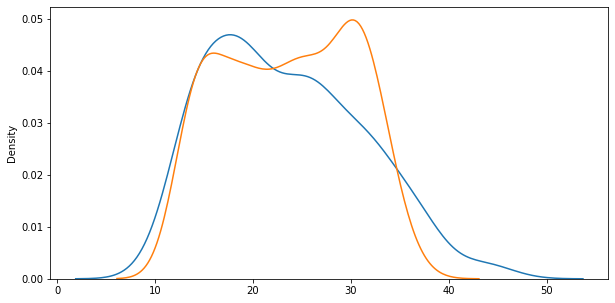
다중회귀분석
여러개의 독립 변수가 종속 변수에 영향을 주고 선형관계를 갖는 경우에는 다중회귀분석을 사용한다.
수학적으로는 Y = b+a_1x_1 + a_2x_2 + ... 와 같이 표현이 된다.
ndf = df[['mpg', 'cylinders', 'horsepower', 'weight']]
x = ndf[['cylinders', 'horsepower','weight']]
y = ndf[['mpg']]

from sklearn.model_selection import train_test_split
x_train, x_test, y_train, y_test = train_test_split(x, y, test_size=0.3, random_state=10)
앞의 단순회귀, 다항회귀와 다른점은 x 변수에 3개의 변수가 할당되었다는 것이다.
모형을 학습하고 검증하는 과정은 앞의 경우들과 똑같다.
from sklearn.linear_model import LinearRegression

lr = LinearRegression()
lr.fit(x_train, y_train)

r_square = lr.score(x_test, y_test)
print(r_square)
print('\n')

print(lr.coef_)
print(lr.intercept_)

0.6939048496695599


[[-0.60691288 -0.03714088 -0.00522268]]
[46.41435127]
이 모형으로 예측한 데이터와 기존 데이터를 비교해보자.
y_hat = lr.predict(x_test)

plt.figure(figsize=(10, 5))
ax1 = sns.distplot(y_test, hist=False, label='y_test')
ax2 = sns.distplot(y_hat, hist=False, label='y_hat', ax=ax1)
plt.show()
plt.close()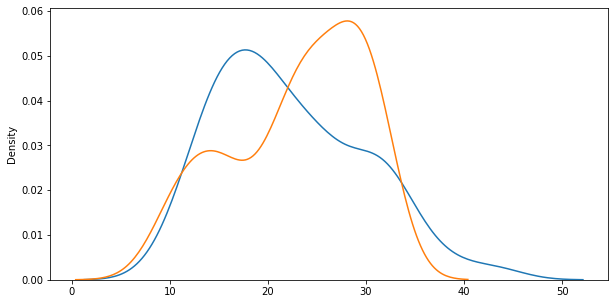
'Study > 혼자 공부하는 판다스' 카테고리의 다른 글
| 혼자 공부하는 판다스 - 의사결정 나무 (1) | 2022.04.30 |
|---|---|
| 혼자 공부하는 판다스 - 머신러닝 (KNN, SVM) (0) | 2022.04.29 |
| 혼자 공부하는 판다스 - 데이터프레임의 다양한 응용(함수 매핑, 열 재구성) (0) | 2022.04.26 |
| 혼자 공부하는 판다스 - 데이터 사전처리(정규화, 시계열 데이터) (0) | 2022.04.22 |
| 혼자 공부하는 판다스 - 데이터 사전 처리(데이터 표준화, 범주형 데이터 처리) (0) | 2022.04.22 |

